
Yale Smart Locks: The Complete NYC Guide (Installation, Reset & Matter Explained)
In New York City, the era of carrying a bulky keychain is ending. Whether you are managing a walk-up in Brooklyn, a condo in Manhattan, or a busy office, access control is shifting from physical brass to digital integration. Leading this revolution is the Yale Smart Lock, a favorite for its balance of high-security hardware and user-friendly software.
But upgrading isn’t just about buying a gadget; it’s about integration. Recent search trends highlight that users aren’t just looking for locks—they are looking for solutions involving Matter connectivity, proper installation, and troubleshooting steps like how to reset a Yale smart lock.
This guide breaks down everything you need to know about the Yale ecosystem, from the new Assure Lock 2 features to professional installation tips for NYC’s unique door frames. As a certified installer, Mr. Locks is here to ensure your transition to keyless entry is seamless and secure.
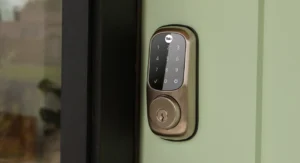
Why Yale? The “Assure Lock 2” & “Matter” Revolution
The smart lock market is flooded with options, but Yale has consistently stayed ahead of the curve by blending traditional locksmith-grade durability with cutting-edge tech. The latest buzzword you’ll see in Yale smart lock news is “Matter,” and it is a game-changer for NYC apartments where tech ecosystems often clash.
The Power of Matter: Why It Matters
If you have ever tried to get a smart device to talk to both an iPhone (Apple Home) and a roommate’s Android (Google Home), you know the struggle. This is where the Yale smart lock with Matter comes in.
Matter is a new universal smart home standard. It acts as a common language that allows your Yale lock to communicate directly with Apple Home, Amazon Alexa, Google Home, and Samsung SmartThings simultaneously, without needing multiple proprietary bridges or complex cloud integrations.
For a busy New Yorker, this means:
-
Faster Response: Matter devices often communicate locally over Wi-Fi or Thread, meaning your door unlocks instantly without waiting for a signal to bounce off a cloud server.
-
Unified Control: You can unlock the door using Siri while your partner uses Alexa, with no friction.
-
Future Proofing: As you add more smart devices to your apartment, a Matter-enabled Yale lock will automatically play nice with them.
Yale Assure Lock 2 Reviews: Keyed vs. Key-Free
When choosing a model, most of our clients debate between the Keyed and Key-Free Touchscreen models.
-
The Key-Free Model: This is the sleekest option. It eliminates the cylinder entirely, meaning the lock cannot be picked or bumped. If the batteries die, you simply hold a 9V battery to the bottom terminals to power it up temporarily. It is ideal for Airbnb hosts or modern luxury rentals.
-
The Keyed Model: For those who still want the peace of mind of a physical backup key, this model retains a traditional keyway. In NYC, where super/landlord access is sometimes legally required, this is often the safer bet.
Installation: DIY vs. Pro (NYC Reality Check)
If you search “how to install Yale smart lock,” you will find hundreds of videos showing a person installing the lock on a perfect, brand-new door in a suburban house.
New York City is different.
Installing a smart lock on a pre-war door in the West Village or a fire-rated metal door in a Midtown high-rise presents unique challenges that YouTube tutorials rarely cover.
The “Sticky Bolt” Problem
Smart locks rely on a small motor to extend and retract the deadbolt. This motor is not as strong as your hand. If your door is warped, painted over 20 times (the “landlord special”), or misaligned, you likely have to push or pull the door slightly to get your current deadbolt to click into place.
A human can do this subconsciously. A Yale smart lock cannot. If the bolt meets resistance, it will jam, drain its battery in weeks, and potentially leave your door unlocked.
-
The Fix: The strike plate on the door frame often needs to be filed down or repositioned by mere millimeters to ensure a frictionless glide.
Self-Closing Doors & Fire Codes
Most NYC apartment doors are required by law to be self-closing and fire-rated.
-
Weight Imbalance: Some older smart locks are heavy. If installed incorrectly, they can throw off the balance of the door, preventing the self-closing mechanism from working. This is a violation of NYC housing codes and can result in fines during inspection.
-
Fire Ratings: You cannot simply drill new holes into a fire-rated door to make a lock fit. Doing so voids the fire rating and puts the building at risk.
Professional Installation Services: This is where Mr. Locks steps in. We don’t just screw the lock on; we calibrate the door alignment. We chisel out strike plates for a perfect fit, ensure the self-closing mechanism remains compliant, and verify that the lock engages smoothly without battery-draining friction.
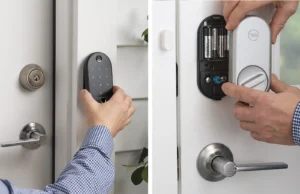
How to Reset & Troubleshoot Your Yale Lock
Even the best technology hiccups. Whether you are moving out, lost your phone, or inherited a lock from a previous tenant, you might need to perform a factory reset.
How to Reset Yale Smart Lock (Factory Reset)
If you need to wipe all codes and digital keys from the lock, a factory reset is required.
-
Step 1: Remove the battery cover and remove one battery.
-
Step 2: Remove the lock from the door? Not yet. You actually need to remove the inside body of the lock from the mounting plate to access the reset button on the back of the device. (On some newer Assure 2 models, the button is accessible under the battery cover—check your specific model).
-
Step 3: While holding down the reset button, reinsert the battery.
-
Step 4: Keep holding the button until the light flashes red or the lock speaks.
-
Step 5: The lock is now reset. You must create a new Master PIN code immediately.
How to Change Code on Yale Smart Lock
You don’t always need a full reset. If you just broke up with a partner or changed dog walkers, you can change entry codes in seconds.
-
Via the App (Easiest): Open the Yale Access app, go to the Guest List, select the user, and update their entry code.
-
Via the Keypad:
-
Enter your Master Entry Code.
-
Press the Gear icon.
-
Press 2 (Manage Entry Codes) -> Gear.
-
Press 1 (Modify Code) -> Gear.
-
Enter the new code -> Gear.
-
How to Remove Yale Smart Lock From Door
Moving out? Here is how to remove a Yale smart lock from your door without damaging it:
-
Remove the Cover: Slide the black battery cover up and take out the batteries.
-
Unscrew Inside Unit: Look for two small black screws near the battery pack. Unscrew them.
-
Disconnect Cable: Gently pull the inside unit off the door. You will see a cable connecting it to the outside keypad. Unclip this connector carefully.
-
Remove Mounting Plate: Unscrew the two long bolts holding the metal mounting plate to the front keypad.
-
Remove Keypad: The front part of the lock will now slide right off the front of the door.
FAQ: Batteries, Security & NYC Landlords
Q: What is the battery life on a Yale Assure Lock 2? A: With the Wi-Fi module, expect about 3 months of battery life. If you use the Z-Wave or standard Bluetooth versions (connected to a hub), you can get 6 to 9 months.
-
Pro Tip: Don’t wait for the lock to die. When the low-battery alert flashes, change them immediately with high-quality non-rechargeable alkaline batteries.
Q: Are smart locks allowed in NYC rentals? A: Generally, yes, but you must provide the landlord with a physical key or a master code. This is why we often recommend the Keyed model for renters, so the landlord’s master key system can potentially be retained or re-keyed. Always check your lease first.
Q: My lock is jamming constantly. What do I do? A: This is 99% of the time an alignment issue, not a broken lock. Your door frame has likely shifted due to humidity or temperature changes. You can try adjusting the strike plate yourself, or call a locksmith to realign the door.
Conclusion
The Yale Smart Lock represents the perfect upgrade for New York living—secure, convenient, and now with Matter, more connected than ever. However, a smart lock is only as smart as its installation. A misaligned lock on a heavy NYC fire door is just a frustrating gadget waiting to fail.
Don’t risk a lockout or a security violation. Whether you need a fresh installation, a retrofit on a vintage door, or help troubleshooting an existing system, Mr. Locks is New York City’s trusted security partner.
How to Factory Reset Your Assure Lock 2 – Yale support How to Manage and Change Entry Codes In-App – Yale support NYC Door Compliance Standards – Manhattan Door
Ready to upgrade? Contact Mr. Locks today for a consultation.
- Phone: 212-780-0144
- Email: info@mr-locks.com